Treat Image-to-Video Like a Test, Not a Vibe: Logging 14 Runs Across 5 Models in a CSV
A small evaluation setup for AI video models, the run log schema I used, and what one session of data did and did not show
Most advice about image-to-video models is anecdotal. Someone tries a prompt, likes the clip, and writes it up. I wanted something I could rerun and argue with, so for one session on 2026-10-08 I treated it like a small test: six fixed still images, five models, 14 runs, and one CSV row per run with price, wait time, output size and a verdict.
The raw data is public: runs.csv and the exact prompts on GitHub (CC BY 4.0). If you disagree with a verdict, every prompt and setting is there to rerun.
Disclosure. I'm Alex Wang and I work on MixVio. All 14 runs were made on MixVio, so this is not a comparison of platforms. Every image and clip referenced here is AI-generated. I edited this text with help from an AI writing assistant; the numbers come from the run log.
The setup
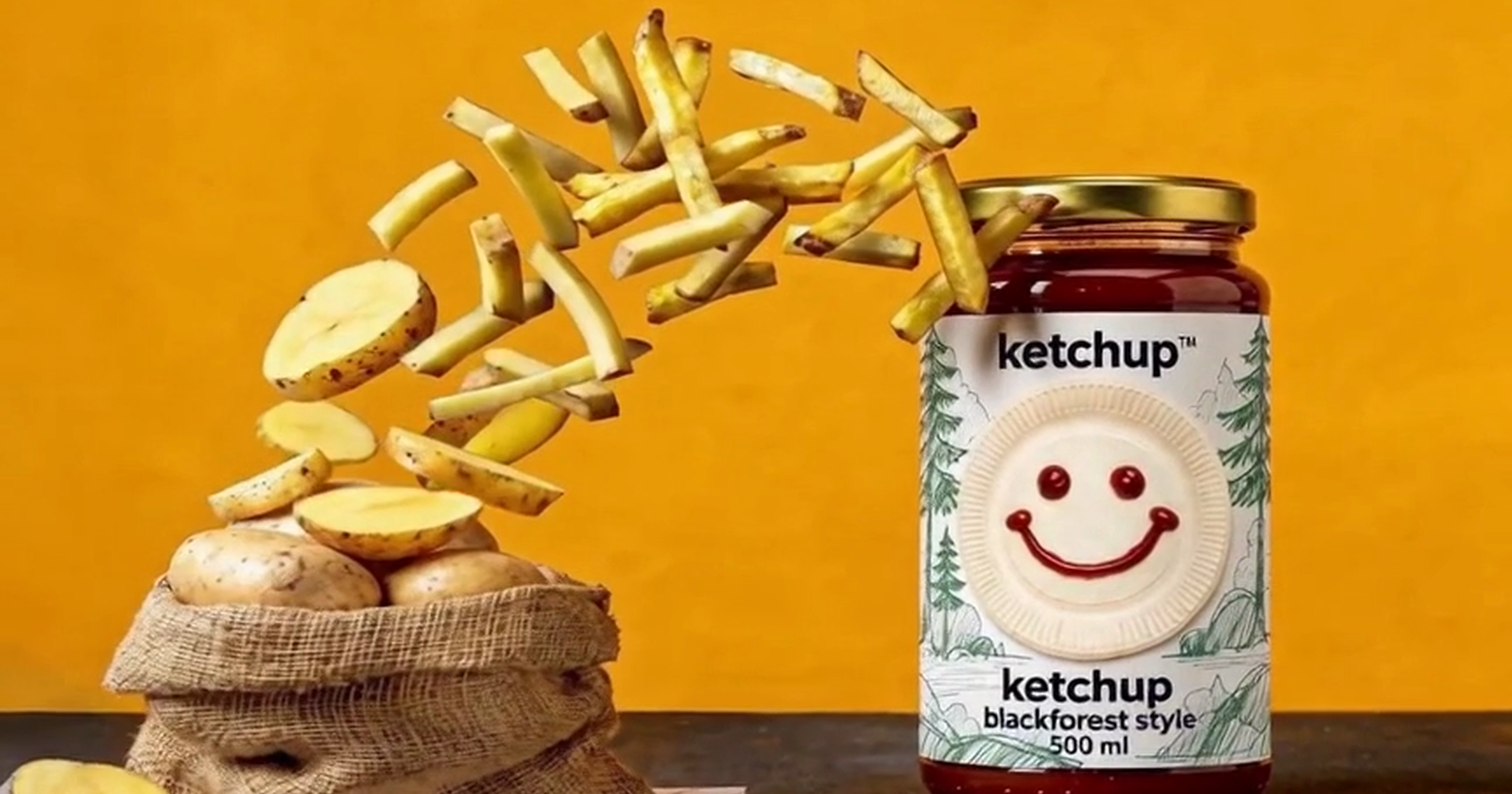
Fixed inputs. Six AI-generated stills of fictional people and products: a ketchup jar with fries in mid-air, a studio portrait, a back view in a flower field, a cafe creator in front of a menu board, a loose pencil sketch, and a perfume bottle with start and end frames.
One variable at a time. Within a shot, either the model changed and the prompt stayed byte-for-byte identical, or the prompt changed and the model stayed the same. Runs 01 and 04 are the prompt pair: same jar, same model (Seedance 2.0), same price, different prompt. Runs 01 and 03 are a model pair with the same prompt. Duration stayed at each model's default (5 s, or 6 s for Veo 3.1 Fast). Resolution did not stay fixed, which comes up again under limitations.
Serial jobs. One job at a time on one account. Run 05's wait still includes queue time, and the log says so.
The run log schema
Thirteen columns:
run, shot, source_ratio, mode, model, settings, prompt,
credits_paid, credits_list, wait_minutes_approx,
output_resolution, kept, notes
A few of these earned their place:
credits_paidandcredits_listare separate. Four of the five models were discounted on test day, and a single price column would make the totals meaningless a week later.source_ratiositting next tooutput_resolutionexposes silent reframing. The 16:10 ketchup photo came back from Seedance 2.0 as 864x496 with the ratio on Auto, which is roughly 16:9.promptis stored verbatim rather than as a template ID, so "same prompt" is checkable, not a claim.keptis the verdict, defined as "would I publish this clip as-is?"
Three rows, with prompts and notes shortened:
04,"Ketchup jar, scene-style prompt",16:10,start frame,Seedance 2.0,480p,"A bright studio product shot of a ketchup jar…",33,65,5,864x496,no,"Model added action nobody asked for…"
09,Cafe creator holding a donut box,16:9,start frame,MiniMax H3,5 s; 768p,"She lifts the box slightly toward the camera and says…",15,15,2,1344x768,picture only,"Stable picture and a clear menu board, but a garbled phrase was added before the line…"
12,"Perfume bottle, glass to crystal",about 9:16,start + end frame,MiniMax H3,5 s; 768p,"The clear glass slowly transforms into cut crystal…",15,15,1.5,768x1376,yes (best),Smooth change from glass to cut crystal between about 1 s and 2.5 s. …
What I'd change next time: kept ended up with five distinct values (yes, no, yes (second choice), yes (best), picture only), and wait_minutes_approx has one non-numeric cell (7.5 (incl. queue)). Fine for a human, annoying in pandas. A boolean usable, a rank and a queued flag would fix it.
Reviewing clips without scrubbing
Cuts, camera drift and text changes hide in motion, so I reviewed every clip as frame strips and contact sheets. A single-row strip at two frames per second is one command with ffmpeg's tile filter:
ffmpeg -i run11.mp4 -vf "fps=2,scale=256:-2,tile=10x1" -frames:v 1 run11-strip.png
Ten tiles at 2 fps covers a 5 s clip; widen the grid for longer ones.
For the two clips with scripted speech, I transcribed locally with Whisper and compared the text against the script. SRT output keeps timestamps, so you can see where extra words land:
whisper run09.mp4 --model base --language en --output_format srt
The metric: cost per usable clip
Average cost per run is the number a pricing page gives you, and it's the wrong one. The session cost 386 credits for 14 runs, about 28 per run. Only 7 clips were usable, so the real figure was about 55 credits per usable clip, roughly double. At list prices the same 14 runs would have cost 750 credits; MiniMax H3 was the only model that wasn't discounted.
The gap between 28 and 55 is the retry tax, and it's the part that prompting and model choice can move. The pencil sketch alone used 86 credits over three runs and produced nothing usable.
What the data showed
1. Motion prompts beat scene prompts. Run 01 described what moves and ended with "Keep the jar label sharp and unchanged, background still." Run 04 described the picture like an image prompt, at the same 33 credits, and the model invented action: whole potatoes launched out of the sack, a sparkle effect appeared, the camera rose, and a surface that isn't in the photo showed up under the jar. Explicit "keep X unchanged" clauses held up well: the jar label survived all three ketchup runs, and all nine menu-board prices survived both cafe runs.
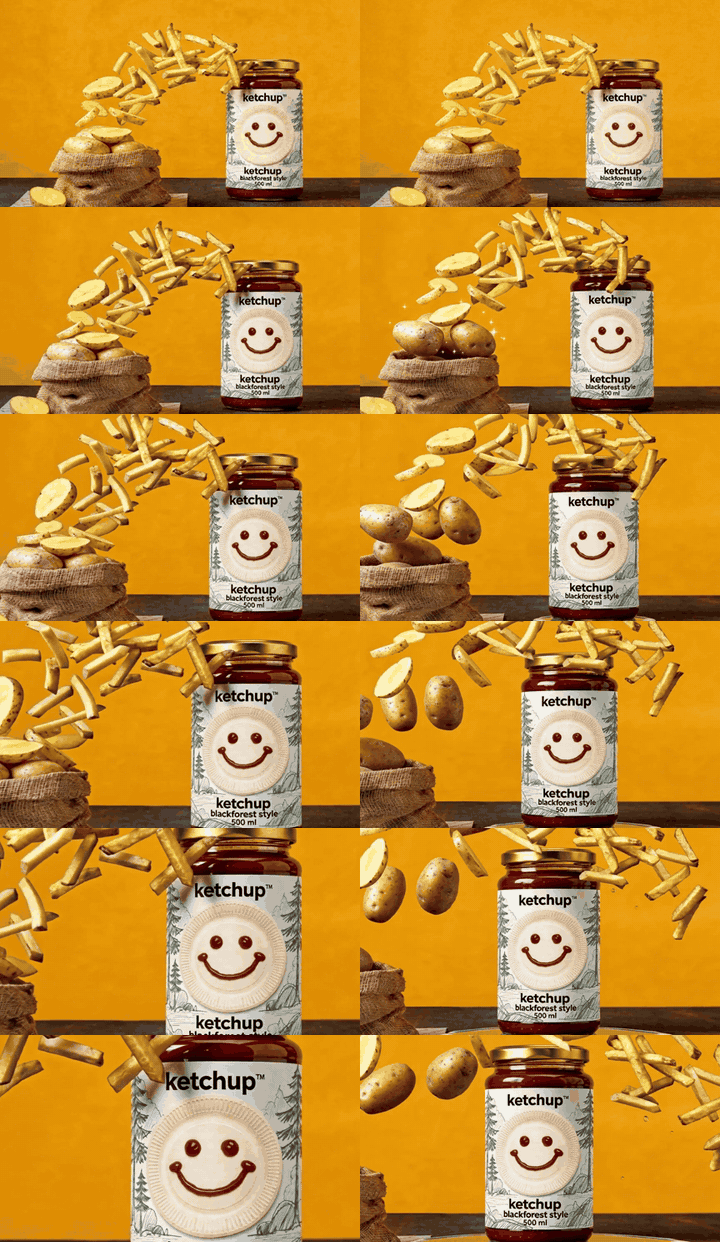
Run 01 (motion prompt) next to run 04 (scene prompt), same photo and model. AI-generated.
2. Camera instructions were the least reliable field. Seedance 2.0 pushed "slow push-in" all the way to a label close-up. Kling 3.0 ignored it. "Locked-off camera" and "camera stays still" both drifted on Seedance 2.0. Direction words failed too: "to the left over her shoulder" went to her left on Seedance 2.0 Mini and the opposite way on Veo 3.1 Fast. She faces away from the camera, so her left is also screen left; Veo simply got it wrong. Write "screen left" anyway, so the side never depends on which way the subject faces.
3. Start and end frames went 2 for 2. Both perfume runs were usable. MiniMax H3 (15 credits, about 1.5 minutes) kept the QUIETUDE label crisp throughout the change; Seedance 2.0 at 480p got there but softer, with slight drift.

The label at four points in run 12 (MiniMax H3), from start frame to end frame. AI-generated.
4. Some inputs shouldn't be animated. The pencil sketch failed three times. Seedance 2.0 Mini redrew it as clean cel animation. Kling 3.0 hard-cut to a new angle after about 2 s and swapped the goggles for headphones. The retry with "Continuous single shot, no cuts" removed the cut, but the pencil texture was still gone.
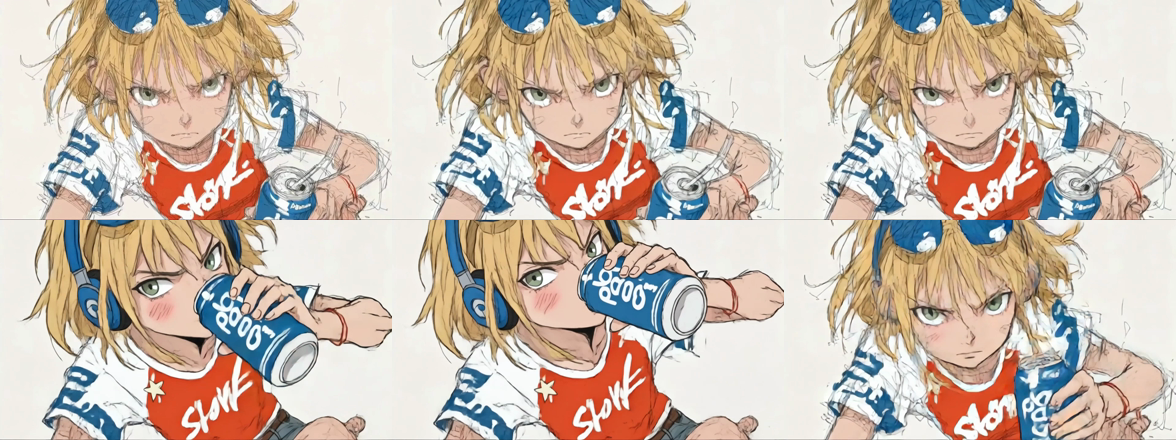
Frames from run 11 (Kling 3.0) showing the unwanted cut. AI-generated.
5. Speech needs a transcript check. Seedance 2.0 said the line word for word. MiniMax H3 added a garbled phrase before it and slurred "gummy". The picture was good enough to ship; only the transcript caught the problem.
On wait times, Kling 3.0, MiniMax H3 and Veo 3.1 Fast finished in about 1.5 to 2 minutes, while Seedance 2.0 took 3.5 to 7.5.
Limitations
One run per verdict. These models are stochastic and I didn't repeat any configuration, so there is no variance estimate. A "no" could be bad luck; a "yes" could be good luck.
Resolution wasn't controlled. Seedance runs were at 480p, Kling 3.0 and Veo 3.1 Fast at 720p, MiniMax H3 at 768p. Judgments about soft text partly reflect that.
Single platform, single day. Prices and model behavior change, and other platforms may configure the same models differently.
One reviewer.
keptis my judgment, not a blinded rating.No model-side failures happened, so the log says nothing about how failed jobs are billed.
Small n. Six images and 14 runs are enough to surface failure modes, not to rank models.
If you rerun a row, especially the same row several times to get at variance, I'd like to see the result.
Where the runs were made
Every run went through MixVio's image to video tool, which puts these five models behind one upload and shows the credit price before each run; that's where the two price columns came from. I work there, which made it the convenient harness; nothing here shows it is better or worse than alternatives. Runway's image-to-video prompting guide is a good platform-neutral read on prompting with the motion a photo already implies. A longer, less technical write-up with more clips is on Medium.
Alex Wang works on MixVio AI.